OWC 11-Port Thunderbolt 4 Dock - Macfixit Australia
Skip to content

OWC 11-Port Thunderbolt 4 Dock

SKU OWCTB4DOCK
by OWC
Original price $504.99
Original price $504.99 - Original price $504.99
Original price $504.99
Current price $464.99
$464.99 - $464.99
Current price $464.99
Save 8% Save 8%

This item is in stock and will ship within 24 hours.

Google Reviews
4.8 ★★★★★
679 reviews
Quality Score
4.8 ★★★★★
1,353 reviews
Trusted Platform
Secure Shopping
SSL Encrypted
Judge.me Verified
4.9 ★★★★★
2,511 reviews
Fast Shipping
Flat rate $11.90
under 5kg (ex NT)
Australian Owned
& operated
since 2005
Secure Checkout
100% protected
SSL encrypted
Expert Support
Email or
request a call back

OWC

Thunderbolt Dock

Add three Thunderbolt 4 ports, 4 USB ports, along with Ethernet, audio, and card reader functionality to your Thunderbolt 3 Mac or Thunderbolt 4 PC.
Connectivity and Convenience
Unleashing the full potential of your Apple M1, M2 Mac or any other Intel Mac and PC with Thunderbolt 3/4 has never been easier. The OWC Thunderbolt Dock is a great way to finally get around cable clutter both in that portable gear, headphones, and SD cards are now within convenient access, but also all USB devices can easily be connected without a hassle. When added to the multitude of other features like Gigabit Ethernet, this dock works as the ideal device for whatever workflow you may have in mind. With its help, upgrading your setup has never been simpler - no need to worry about cords and wires ever again!

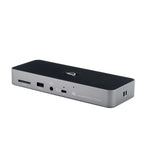
  • (1) Thunderbolt 4 (USB-C) with up to 96W computer power delivery
  • (3) Thunderbolt 4 (USB-C)
  • (3) USB 3 Type-A (10Gb/s)
  • (1) USB 2.0 Type-A with high-power charging (BC 1.2)
  • (1) SD card slot
  • (1) Combo audio in/out jack
  • (1) Gigabit Ethernet


The Past, Present, and Future is Yours
The OWC Thunderbolt Dock unlocks the full potential of today's Macs, offering powerful and versatile connection to an array of devices. Not only does it provide three Thunderbolt ports and four USB ports - but with these comes compatibility across past, present and future devices. Get the most out of your setup with support for up to two 4K displays or a 5K/6K/8K display, high-performance storage including NVMe SSDs, A/V mixers, phones, tablets, and more. Unlocking more productivity is as easy as connecting your desktop accessories such as a keyboard or mouse. With the OWC Thunderbolt Dock at your disposal, you can trust that you'll be able to connect virtually anything.
The Connect-it-all Solution
The latest Thunderbolt interface using the universal USB-C connector is revolutionising the way we transfer data, output video, and charge devices. It offers convenience and peace of mind that regardless of device you are using - MacBook, Windows, future adapters or hardware - there will be a unified connectivity solution for it: the OWC Thunderbolt Dock. This dock has two Thunderbolt ports which use the same USB-C connector for millions of existing and future hardware and computers to provide a multi-connectivity solution. So no matter whether your tech is today's or tomorrow's, you're always covered with Thunderbolt.
Reimagining the Daisy Chain
Daisy chains are a great way to connect multiple devices to your computer port, however, it's not always easy to disconnect a single device from the chain. With the OWC Thunderbolt Dock, you can create three exclusive tree branch chains of devices connected to a single port without any worry. All you have to do is remove a device from one of the branches and there is no need to disconnect or interrupt any other branch. Even better, you can attach three bus-powered Thunderbolt devices without affecting the others. This makes organising complex device network with OWC Thunderbolt Dock an effortless task!
Plug in Multiple Bus-Powered Thunderbolt Drives
A typical limitation of daisy-chaining external storage devices in the past was that bus powered drives had to be placed last; otherwise, performance of other connected devices would suffer. This also made it virtually impossible to securely connect multiple portable SSDs due to the inherent limits of a Thunderbolt chain containing only one bus-powered device. Fortunately, this is no longer the case with OWC's revolutionary Thunderbolt Dock – users can now enjoy blazing fast speeds without compromising on reliability or number of connected devices! So if you're an avid user of external storage, investing in OWC's Thunderbolt Dock is a great way to get the most out of your storage system.
Get Wired 
We've all experienced the frustration of slow and unreliable Wi-Fi connections; that lag can quickly put you off task and behind schedule. Don't settle for sub-par anymore. Plug your wired network into the OWC Thunderbolt Dock and benefit from lightning-fast speeds and uninterrupted downloads. Not only that, but a secure IP-based connection also ensures fast file transfers and increased productivity—perfect for collaborating on big team projects without worrying about internet speeds. The OWC Thunderbolt Dock can help make sure your work stays on track, whenever you need it!
SD Card Reader
If you're a content creator, you know how important it is to move data around quickly and efficiently. That's why you need the OWC Thunderbolt Dock: it has an SD card reader that makes transferring your photo and video files a breeze. With up to 312 MB/s of transfer speed, getting your files onto your computer is a hassle-free process, giving you more time to focus on what truly matters - creating great content. Not only is it easy to get your data onto your machine, but the dock also functions like an external drive so you can store or backup any file with ease. If you're serious about creating digital content, make sure you have the OWC Thunderbolt Dock in your arsenal.
A Higher Vision
The OWC Thunderbolt Dock is a powerful tool for any creative workspace that takes its craft seriously. With the Thunderbolt Technology, users can easily connect to one single 5K/6K/8K display or two 4K displays, giving them an immersive and hi-res viewing experience with more vivid colours and details for CAD drawings. Taking multitasking to another level, you can easily attend video meetings in one screen while editing content on the other in applications from Photoshop to Affinity Photo. Also great for video editors, mix large format video with raw playback on different screens simultaneously. Experience a seamless connection between computer components with the OWC Thunderbolt Dock to optimise your workflow and take it to new heights.
Mac
The OWC Thunderbolt Dock works with any Mac with an available Thunderbolt 3 port running macOS 11.1 Big Sur. Need a Thunderbolt dock that works with older versions of macOS? Check out our selection of award-winning Thunderbolt 3 docks.
Windows PC
The OWC Thunderbolt Dock works with any Windows PC with an available Thunderbolt 4 port. Need a dock for PC without Thunderbolt 4? Rest assured this connectivity wonder stands ready for duty as a USB-C dock. Check out all of our award-winning Thunderbolt and USB-C docks.
iPads and Chromebooks
The OWC Thunderbolt Dock also functions as a USB-C dock for expanding the device connectivity of USB-C equipped machines like iPads and Chromebooks. Now you can add USB devices like a keyboard, mouse, drive, and even a bigger display with a USB-C adapter (sold separately)
Powerful Freedom
The OWC Thunderbolt Dock makes powering up and recharging your portable devices a breeze. Offering up to 90 watts of total charging power, you can keep your laptop charged and ready for mobile activity, give your external devices a shot of power, and free up the Thunderbolt port on your machine! Even if you're taking a break or done using the products for the day, you don't have to worry about losing them: The Dock will keep powering and/or charging all connected devices until they’re completely powered again. No cords cluttering up your desk - just convenience and peace of mind!
Disconnect in One Click
OWC Dock Ejector software safely disconnects multiple drives from the OWC Thunderbolt Dock in a single click. Designed by OWC hardware and software engineers, Dock Ejector ensures all data is written before disconnection, saving time and protecting against data loss. It makes losing your hard-earned work a thing of the past.
SuperDrive Ready
OWC’s free Dock Ejector app includes a special driver that enables your OWC Thunderbolt Dock to play and burn CDs and DVDs with the Apple SuperDrive. Just connect the SuperDrive to an open USB-A port on the OWC Thunderbolt Dock for bus power to watch a DVD movie, listen to music CDs, create a backup disk, and install software.
Secure Your Workflow with OWC ClingOn
Active workspaces expose gear to bumps, shoves, and the random tail wag from a pet. Just one ill-timed touch can cause an accidental cable disconnection interruption to your workflow. OWC ClingOn custom cable stabilisers (sold separately) screw into the OWC Thunderbolt Hub’s housing to secure your Thunderbolt (USB-C) connections so you can work with confidence even in the highest foot traffic environments.


Product Specifications

Specifications
  • Display Support
    • Up to one 8K display @ 60Hz,
    • or one 5K display @ 60Hz,
    • or two 4K displays @ 60Hz,
    • or one 4K display @ 120Hz,
    • or one 4K display @ 60Hz
  • Display Support by Port
    • Thunderbolt 4: Up to 8K @ 60Hz or 4K @ 120Hz via a native Thunderbolt 4 display or other display that supports USB-C connections and DisplayPort 1.4
  • RoHS Compliant
    • Yes
  • Certifications
    • BSMI
    • CE
    • FCC
    • RCM
    • VCCI
  • Data Rate
    • Up to 40Gb/s
  • Reach Certification
    • Yes
  • Ethernet Speeds (RJ-45)
    • 1Gb/s "Gigabit" (1000BASE-T)
    • 100Mb/s (100BASE-T)
    • 10Mb/s (10BASE-T)
Compatibility
  • Mac OS Compatibility
    • macOS 11.x Big Sur
    • macOS 12.x Monterey
  • PC OS Compatibility
    • Windows 11
    • Windows 10 64-bit Edition
  • Mobile OS Compatibility
    • iPadOS 15
    • iPadOS 14
    • Android 12.x
    • Android 11.x
  • Other OS Compatibility
    • Chrome OS
  • Host Port Requirements
    • Works with any Apple silicon Mac or iPad with Thunderbolt (USB-C), Apple ‘Intel’ Mac with Thunderbolt 3, or any Thunderbolt 4 PC. Works as a USB-C dock on any USB-A (with USB-C to USB-A adapter or cable sold separately) or USB-C equipped MacBook, iPad, Chromebook, Android device, or PC. When used on a USB port, bandwidth is reduced, Thunderbolt devices are not supported, and additional functionality will vary depending upon the USB port. On a USB Type-A port, displays and power delivery are not supported. On a USB Type-C port, displays and power delivery functionality will depend upon the host USB Type-C port supporting those functions.
Power
  • Power Supply
    • External UL-listed universal auto-switching power supply
  • AC Input
    • 100-240V, 50-60Hz, 2.5A
  • DC Output
    • +20V, 6.75A
  • Wattage
    • 135W
  • External Power Adapter
    • Yes
  • Power Delivery
    • 96W
Physical
  • Device Ports
    • (4) Thunderbolt 4 (USB-C) Ports
    • (3) USB 3.2 Gen 2 Type-A Ports up to 10Gb/s (1250MB/s) - USB 2.0/3.0 backwards compatible
    • (1) USB 2.0 Port
    • (1) Gigabit Ethernet (GbE) RJ-45 Port
    • (1) 3.5mm Stereo Audio Input/Output Combo Port
  • Memory Card Slots
    • (1) Secure Digital (SD)
  • Security Slot
    • Yes
  • Housing Color
    • Chassis: Space Gray
    • Covers: Black
  • Housing Material
    • Chassis: Aluminum
    • Covers: Polycarbonate
  • Dimensions
    • Height: 2.6 cm (1.0 in)
    • Length: 19.8 cm (7.8 in)
    • Width: 7.3 cm (2.9 in)
  • Weight
    • 400.0 g (0.88 lbs)
Environmental
  • Ambient Temperature
    • Operating: 32°F to 86°F (0°C to 30°C)
    • Non-Operating: -4°F to 140°F (-20°C to 60°C)
  • Altitude
    • Operating: -304.8 m to 3,048.0 m (-1,000 ft to 10,000 ft)
    • Non-Operating: -304.8 m to 12,192.0 m (-1,000 ft to 40,000 ft)
  • Humidity
    • Operating: 5% to 95% non-condensing
    • Non-Operating: 5% to 95% non-condensing

Notes

  • Actual display support varies upon computer specifications. Supported Intel-based Mac models and Thunderbolt 4 PCs support two displays over a Thunderbolt port. The following Apple M1 Mac models support a single display over a Thunderbolt port:
    - MacBook Pro (13-inch, M1, 2020) - MacBookPro17,1
    - MacBook Air (M1, 2020) - MacBookAir10,1
    - Mac mini (M1, 2020) - Macmini9,1
  • The following Mac models have DisplayPort 1.4, but offer only partial support for DisplayPort 1.4, limiting the resolution to (for example) 5K or 6K at 60Hz. Please review Apple's display specifications for your specific Mac to determine the maximum supported resolution and color depth.:
    - MacBook Pro (15-inch, 2018) - MacBookPro15,1
    - MacBook Pro (13-inch, 2018, Four Thunderbolt 3 ports) - MacBookPro15,2
    - MacBook Pro (13-inch, 2019, Four Thunderbolt 3 ports) - MacBookPro15,2
    - MacBook Pro (15-inch, 2019) - MacBookPro15,1 and MacBookPro15,3
    - MacBook Pro (13-inch, 2019, Two Thunderbolt 3 ports) - MacBookPro15,4
    - MacBook Pro (16-inch, 2019) - MacBookPro16,1 and MacBookPro16,4
    - MacBook Pro (13-inch, 2020, Four Thunderbolt 3 ports) - MacBookPro16,2
    - MacBook Pro (13-inch, 2020, Two Thunderbolt 3 ports) - MacBookPro16,3
    - MacBook Air (Retina, 13-inch, 2018) - MacBookAir8,1
    - MacBook Air (Retina, 13-inch, 2019) - MacBookAir8,2
    - MacBook Air (Retina, 13-inch, 2020) - MacBookAir9,1
    - iMac (Retina 5K, 27-inch, 2019) - iMac19,1
    - iMac (Retina 4K, 21.5-inch, 2019) - iMac19,2
    - iMac (Retina 5K, 27-inch, 2020) - iMac20,1 and iMac20,2
    - Mac mini (2018) - Macmini8,1
    - Mac Pro (2019) - MacPro7,1
    - Mac Pro (Rack, 2019) - MacPro7,1
Manufacturer provided specifications for OWC p/n OWCTB4DOCK

  • Australian Owned & Operated
    Macfixit Australia
     is proudly Australian owned and operated, based in Melbourne, Victoria, and serving customers since 2005.
    We’re not a marketplace or a box-mover. Every product and brand we offer is carefully selected to meet Australian quality standards. Our technicians have in-depth knowledge of each product and can help you choose the right solution for your needs.
  • Fast Flat Rate Shipping  
    Shipping is $11.90 (flat rate) for orders under 5kg, excl. NT. Express shipping and shipping protection are available at checkout. Most in-stock orders received by 10:30 AM (Eastern Time) ship the same day; orders received after 11:00 AM ship the following business day.
  • 100% Satisfaction Guaranteed 
    We fully guarantee all of our products. If for some reason you are not happy with any item you purchase from us you may return it for a refund (see Return Policy). 
  • We Respect Your Privacy
    We do not rent, sell, or trade your contact information. Macfixit Australia is committed to keeping your personal data safe.
  • Convenient and Secure Shopping
    All purchases are protected with industry-leading security. We use Symantec Norton SSL for strong encryption, and our site is scanned daily by McAfee Secureto ensure it’s free of malware, viruses, and phishing attacks.
  • Customer Reviews Gold Stars 
    We are part of theGoogleTrusted Store program, which helps verify our service and ensures a secure shopping experience. We also have excellent reviews across other platforms.
  • Local Customer Service & Support
    Our Melbourne-based team is 100% committed to helping you. We monitor emails throughout the day and usually respond within minutes. Customer service is available Mon–Fri, 10:00 AM – 5:30 PM (Melbourne time) via email or by requesting a callback from our friendly team.
Thousands of Orders

Over 700,000 orders shipped across Australia and New Zealand since 2005

Australian-based support 

We stand behind all our products with exceptional local support, pre- and post-sale, to ensure your satisfaction.

30 Day Money Back Guarantee

30-day money-back guarantee. If you’re not completely satisfied, contact us within 30 days to request a refund. A 15% restocking fee may apply for returns

Secure Payments

Encrypted checkout ensures safe, worry-free shopping. We accept most cards, Apple Pay, Google Pay, and bank transfer.