





Apple Silicon for Artificial Intelligence
Run Claude, ChatGPT, Perplexity, Ollama & Llama locally on Apple Silicon. Private, fast, and free from monthly API costs.

Why Apple Silicon
Apple Silicon rewrote the rules for local AI. Here is why developers, researchers, and businesses worldwide are choosing Mac mini and Mac Studio as their primary AI machines.
CPU and GPU share one memory pool with no data transfer penalty. Your AI model sits in unified memory and both processors read it simultaneously — dramatically faster inference than any discrete GPU system at this price point.
The Mac mini M4 draws just 12W at idle and 20–30W under full LLM inference load. Run it 24/7 as a home or office AI server for a fraction of what a GPU workstation consumes — silent and always on.
Your prompts, documents, and business data never leave your machine. Run sensitive workflows through AI without cloud exposure. No data logging, no usage policies, no third-party servers — fully GDPR compliant by design.
A typical user spending $150/mo on Claude or OpenAI API credits can reduce that to near zero by routing everyday tasks to a local 70B model. The hardware pays for itself within 12 months for moderate-to-heavy API users.
No internet connection required once set up. Your AI runs on a plane, in a remote location, or during an outage. Reliable, always-available AI intelligence that does not depend on any external service or subscription.
Serve Claude via API, run Ollama as a local server for your entire network, connect LM Studio to any browser or IDE, and integrate with Cursor, VS Code, and Raycast — all from one compact machine on your desk.
Compatible Platforms
Once your Mac is configured, any AI tool — browser extension, desktop app, or developer SDK — can connect to it as a local inference engine.
Use the Anthropic API directly from your Mac. Ollama v0.14.0+ also exposes an Anthropic-compatible endpoint, so any Claude-built tool can route to locally running open-weight models at zero cost per token.
Connect any ChatGPT-compatible browser extension or application to your local Mac server. Ollama and LM Studio both expose an OpenAI-compatible REST API — any tool built for ChatGPT works without modification.
Use Perplexity alongside your local Mac AI setup — Perplexity handles live web research while your local models process private or high-frequency queries offline.
Ollama is the easiest way to run open-source LLMs on Apple Silicon. Install in seconds, pull Llama 3, Mistral, Phi, or Gemma, and get an OpenAI-compatible API endpoint locally.
Access Google’s Gemini models via API from your Mac. Use Gemini for multimodal tasks while routing text-heavy workloads to your local models.
Mistral’s models run exceptionally well on Apple Silicon. Pull them via Ollama for fast, efficient inference on Mac mini M4.
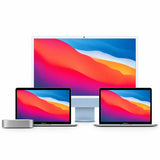
Recommended Hardware

10-core CPU · 10-core GPU
10-core CPU · 10-core GPU
10-core CPU · 10-core GPU

14-core CPU · 32-core GPU
Macfixit’s AI Setup & Installation Service gets you running in under an hour — Claude, Ollama, OpenAI API, and your choice of local models, all configured and tested.
View AI Setup Service