

Mac mini Memory RAM
OWC Memory Upgrades

One of the easiest and most cost-effective ways to improve the performance of your Mac mini is to increase the RAM (Random Access Memory). More memory means your Mac mini can better handle multitasking between programs, perform faster during most day-to-day tasks, and it will also be less susceptible to spinning beachballs and crashes. If you work with large files or use memory-intensive applications, maxing out your RAM is a must.
OWC Memory — Is the highest quality Apple Mac mini RAM memory available in Australia: It is high performance and also rigorously in-house lab tested by OWC to ensure superior quality, perfect compatibility and reliability. We offer an Australian lifetime replacement warranty as well as 30 day no questions asked returns on all OWC Mac Memory upgrade and SSD products.


Mac mini (Intel 2018 - 2020)
Up to 64GB of memory

Mac mini (2012)
Up to 16GB of memory
Mac mini (2011)
Up to 16GB of memory
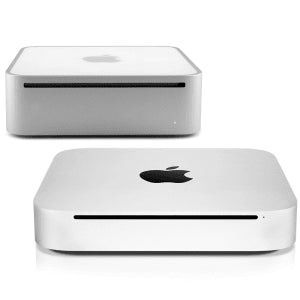
Mac mini (2009 & 2010)
Up to 16GB of memory
 Rigorously in-house lab tested.
 Easy DIY install videos.
 Australian lifetime warranty replacement.
Why can't I upgrade my Mac mini memory?
The Mac mini models released in late 2014 had the memory soldered directly on the logic board, and as a result, cannot be upgraded after purchase. It is possible to upgrade the memory of the 2018 Mac mini, but the process is involved and could take around 40 minutes to complete. All 2020 and later M1 Mac mini models have memory integrated into the Apple M1 chip and cannot be upgraded.
Since the first Mac mini was released in 2006, OWC has offered Apple-compatible memory upgrades for nearly any Mac mini model. To make the memory installation process as straightforward as possible, we provide step-by-step installation videos to walk users through the upgrade process. We also offer expert technical support who are more than happy to answer any questions you may have. All OWC brand memory is thoroughly tested and assured to perform flawlessly with your particular Mac mini model and is covered by a Lifetime Advance Replacement Warranty and a Money-Back Guarantee.
How to find your Mac's Model ID
Click the Apple menu → About This Mac. Your model name and year are shown there.
For the exact Model Identifier (e.g. Macmini8,1), click More Info → System Report and look for Model Identifier under Hardware.
Still not sure? Email helpdesk@macfixit.com.au with your Mac's serial number and we'll confirm the right memory.